Wundur Studio

Native Mac app · open source

Build the thing you keep picturing.

You already know what it should be, whether it's a game you've been sketching in your head or a tool you wish existed. Wundur Studio puts an AI coding agent to work on it, in a window made for watching your idea take shape, with your project right beside the conversation.

The models make the pieces. The art is the world you put together.

Wundur Studio assembling a gameAn isometric voxel scene. The little cube cursor from the Wundur icon stands on a periwinkle platform, beside a billboard with the app icon, while a golden crane lifts blocks labelled Code, Art, Audio, Models and Playtest into a row, one by one, until the game is complete. Two status tags read: Boss sprite, working; Jump sound, needs you. Above the character, a thought bubble shows the world it imagines: a small floating island with a castle and a tree, then a rocket passing a planet, then a knight with a shield and a sword.CodeArtAudioModelsPlaytestBoss sprite · workingJump sound · needs you
A game, one block at a time.

What Wundur Studio looks like

The Wundur Studio window with a small browser game, Star Hopper. On the far left, buttons for Projects, Inbox and Tasks. Next to them, the star-hopper project with three sessions: Double jump, Collect a star and Ship it to itch.io. Below, the project's files, with the changed game.js and player.js marked M. In the middle, the chat: the request to add a double jump, two finished subagent cards that each read a file, the agent's plan, and an Edit card with a green and red diff of player.js. On the right, a terminal serving the game with python3 -m http.server.
  1. 1Projects Every folder is a project, with its sessions under it, each keeping its own branch, conversation and layout.
  2. 2Tools Files with what changed marked, the changes, the agent's subagents and its skills.
  3. 3Agent Tool calls as cards, subagents as they run, real diffs.

Why it exists

Getting an idea out of your head is the hard part.

An AI agent can now write much of the code that turns an idea into something real. Following along is another matter. In a terminal it all scrolls past as one long log, and a few minutes in it's hard to tell whether what's being built is still the thing you meant.

Wundur keeps your idea in view. The conversation, what each turn changed and the project it all goes into share one window, so you can see it coming together and steer before it drifts. It runs the agent you already use, exactly as it ships, and never rewrites what the agent does.

The full story · What changed today

When it needs art and sound

Make the pieces in the same place.

A game needs more than code. With Wundur's game-assets pack, the agent can make images, sound effects, voices and music, and 3D models it can rig and animate. You can turn a model around in a viewer beside the chat before you keep it. Everything lands in your project as ordinary files, ready for whatever engine you use.

The pieces come from AI image, sound and 3D services that you connect with your own keys, and Wundur asks you before every run that costs money. They're AI-made, and you decide which ones stay.

While it's being built

Watch your idea come together, one turn at a time.

Steps only you can take, as a checklist

Some steps are yours: signing in somewhere, accepting an agreement, adding a secret, trying the game on your phone. Instead of burying them in a long reply, the agent hands them to you as numbered cards, each with the command to copy and the page to open. Tick them off as you go; the agent can see what's left and tick off the ones it checked.
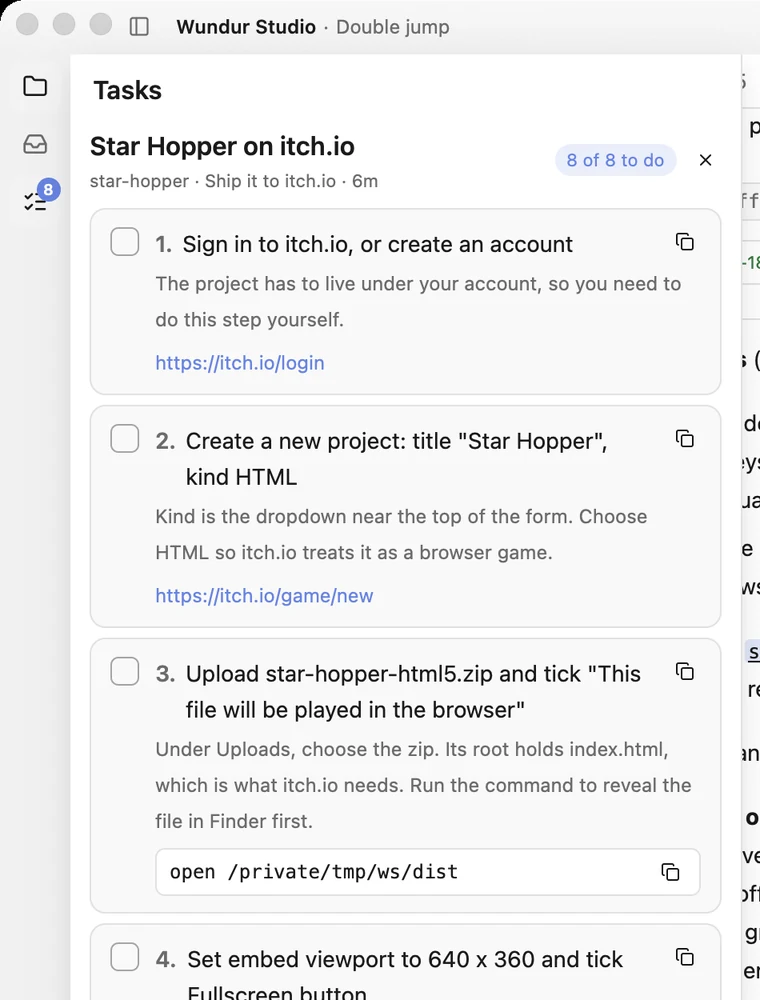
The Tasks panel with a list called Star Hopper on itch.io, 8 of 8 to do, made by the Ship it to itch.io session. Numbered cards with checkboxes: 1, Sign in to itch.io, or create an account, with a link to the sign-in page; 2, Create a new project, kind HTML, with a link; 3, Upload the zip and tick This file will be played in the browser, with a command to copy that reveals the zip in Finder.

Nothing waits unnoticed

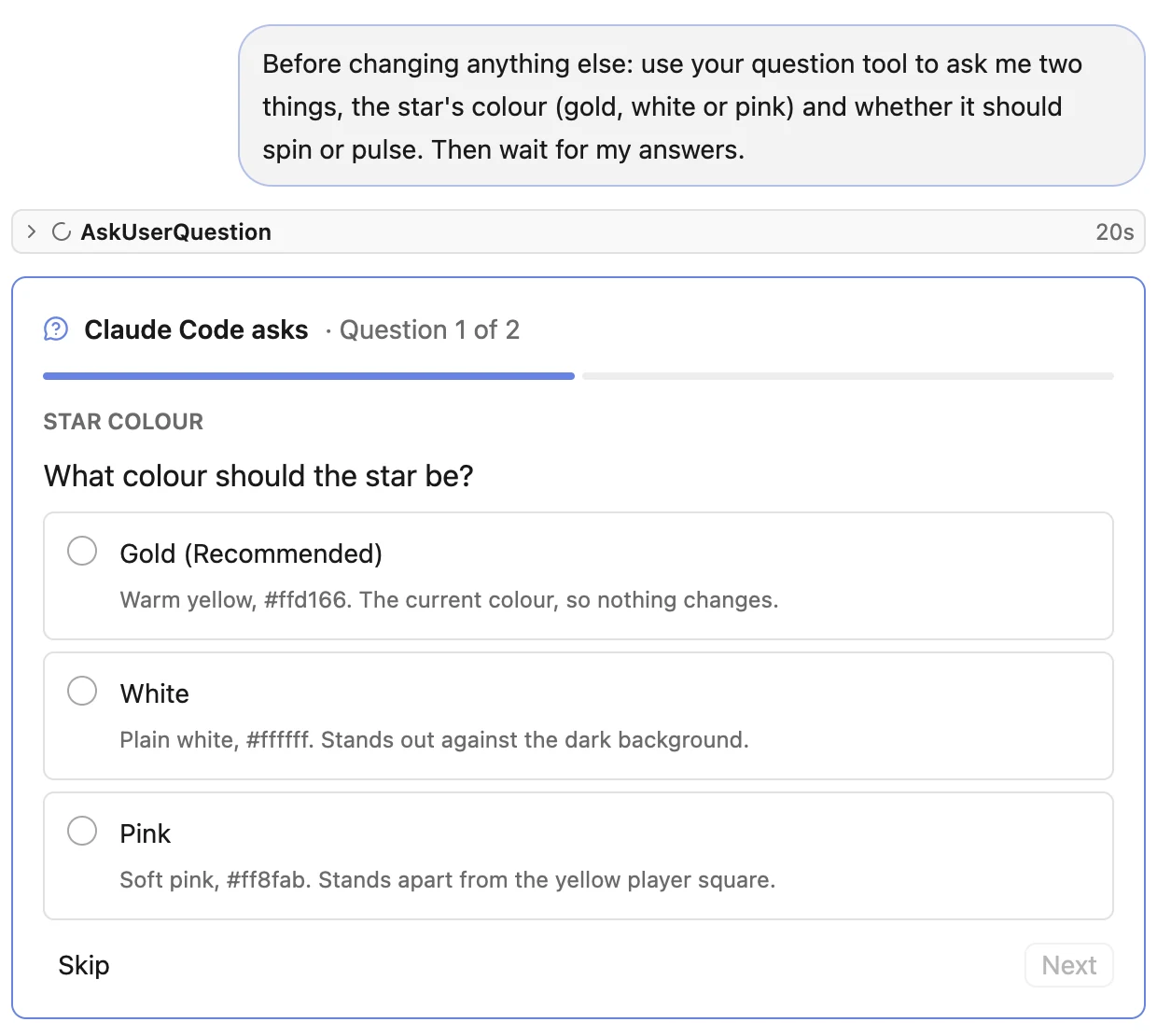
When the agent has questions, they come one at a time as a card, each answer with what it means. When it wants to run a command, the chat shows the exact command with Allow and Deny. The session is marked Needs you in the list, and the Dock icon bounces once if you're looking at something else.

A question card in the chat: Claude Code asks, question 1 of 2, Star colour. What colour should the star be? Three answers, each with a line on what it means: Gold (recommended), White and Pink. Skip and Next buttons below.

One inbox for every session

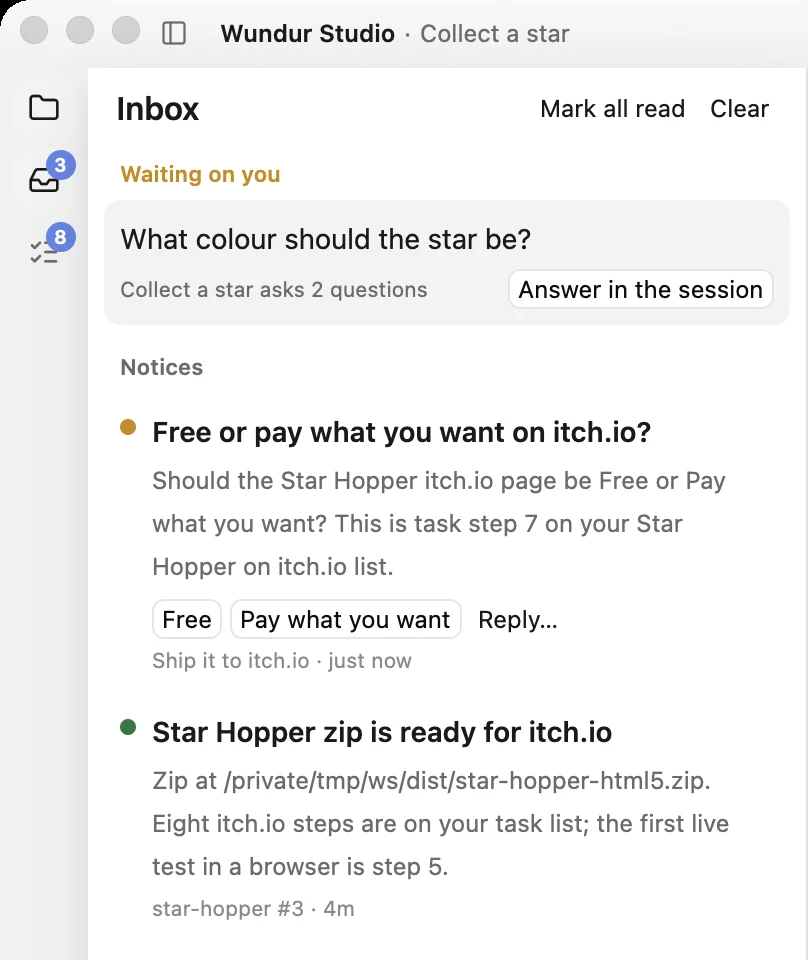
Agents can send you a notice when something is done or needs a decision, and the inbox keeps them for you across every session and project. Questions still waiting are at the top. A notice that asks something comes with its answers as buttons, or write your own reply, and it goes straight back to the agent that asked.

The Inbox. Under Waiting on you: What colour should the star be?, from the Collect a star session, with Answer in the session. Under Notices: Free or pay what you want on itch.io?, with the buttons Free and Pay what you want and a Reply link; and Star Hopper zip is ready for itch.io, saying where the zip is and that eight steps are on the task list.

Start a session, or pick one back up

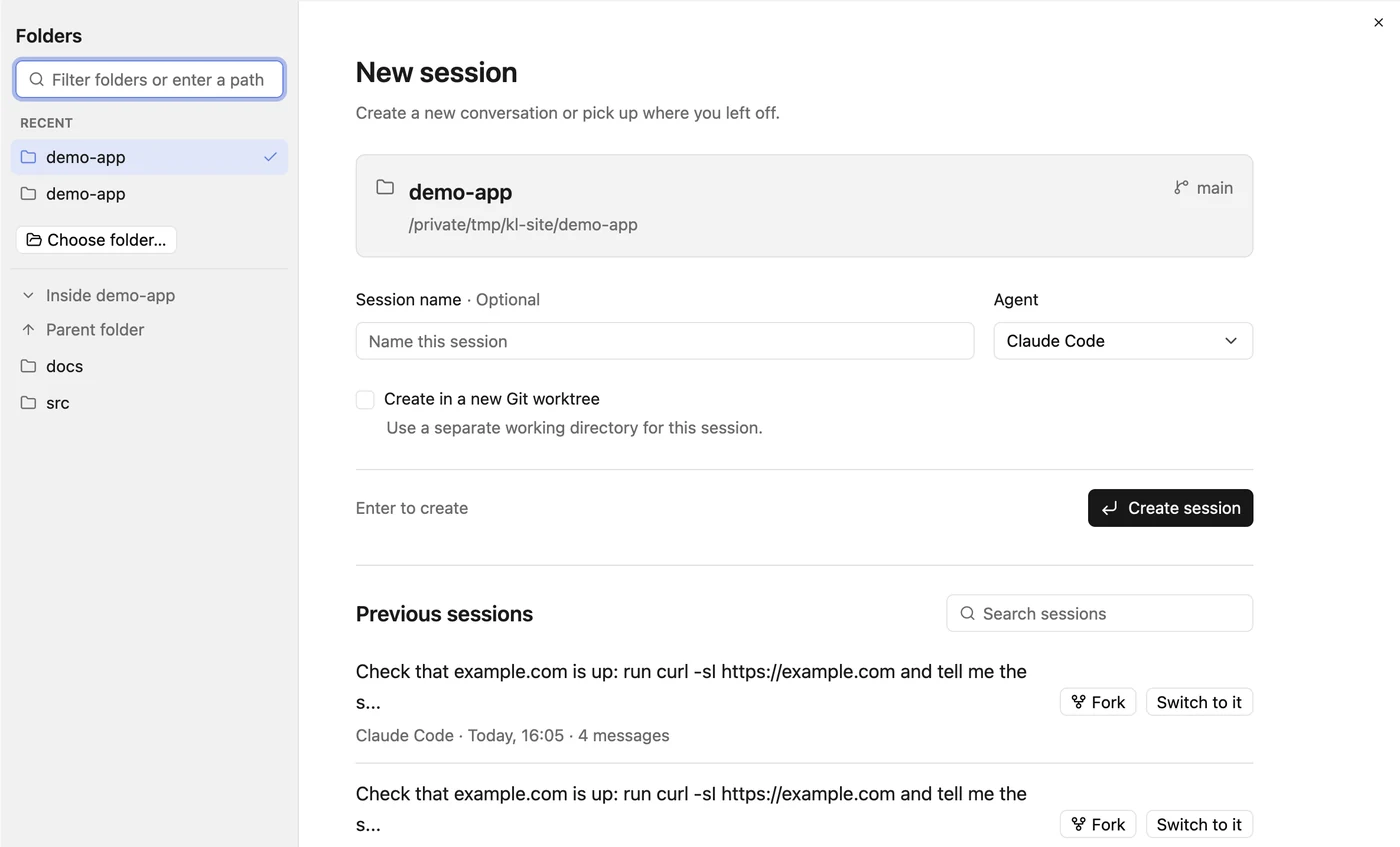
The New session screen starts from a folder. Pick one, name the session if you like, choose the agent, and tick a box to work in a new git worktree. The folder's previous sessions are listed underneath: resume one, switch to one that's already open, or fork it into a new session. Sessions gather under their project in the list, and Cmd+P jumps to any of them by name.

The New session screen. On the left, the projects list, then a folder sidebar with a filter, recent folders, Choose folder and the chosen folder's subfolders. On the right, the chosen folder, star-hopper, with its git branch; an optional session name, the agent picker set to Claude Code, a Create in a new Git worktree checkbox and a Create session button. Below, the folder's three previous sessions with a search box, each with Fork and Switch to it.

Know which skills the agent can load

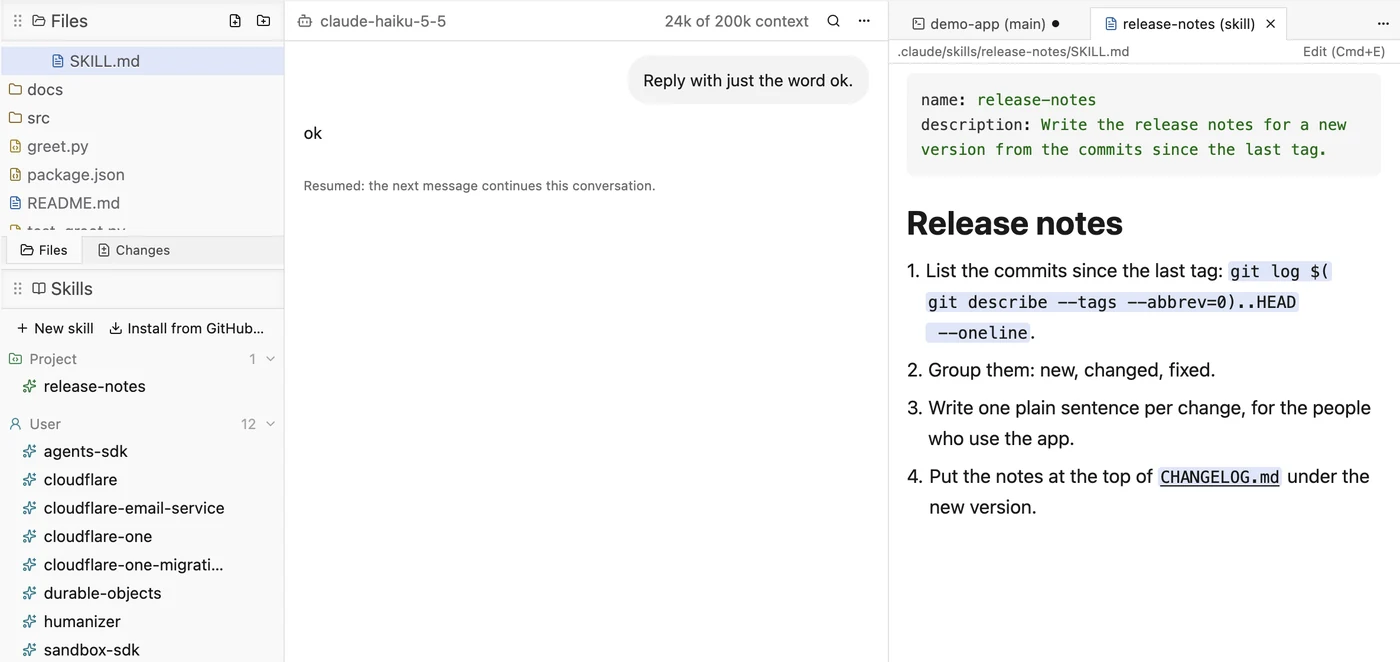
One panel lists every skill the agent can load, from the project, your home folder and installed plugins. Open one to read it beside your work, or edit it in place.

The Skills panel under the projects list, with the project's level-ideas skill, the user's skills and a plugin's, folded. The conversation in the middle, and the level-ideas skill file open on the right, rendered with its name, description and four steps.

Fix things without leaving

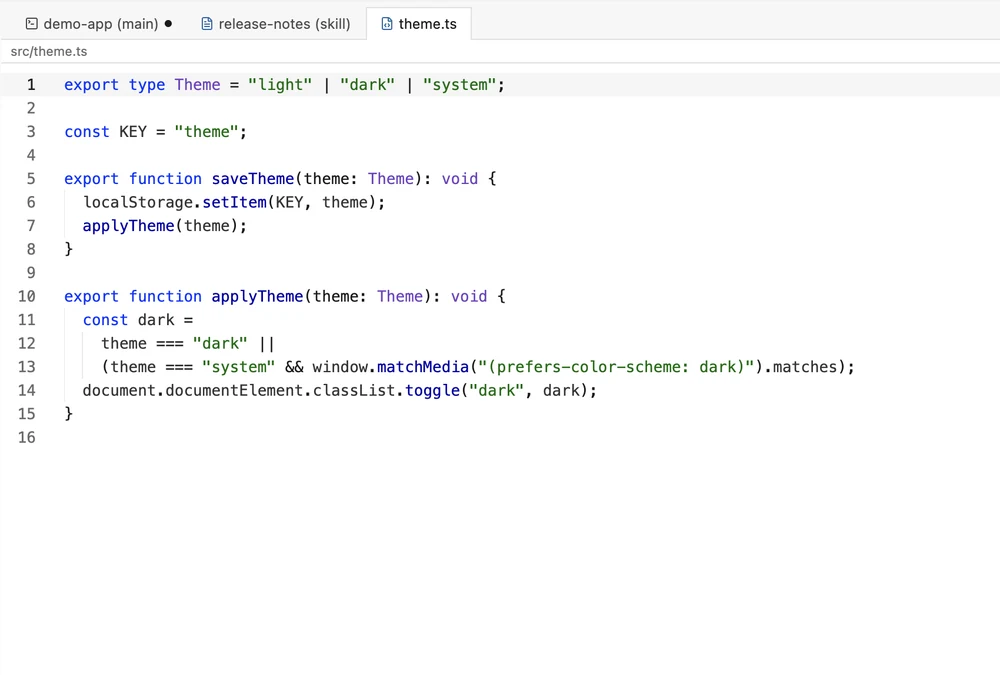
A file tree, an editor with syntax highlighting and go to definition, and real terminals share the window with the session. When something looks off, open the file and fix it. Panels dock and split by drag and drop.

The editor showing player.js from the game, with syntax highlighting and line numbers: the gravity and jump constants, and the Player class with its constructor and update method, including the double jump.

Set it up your way

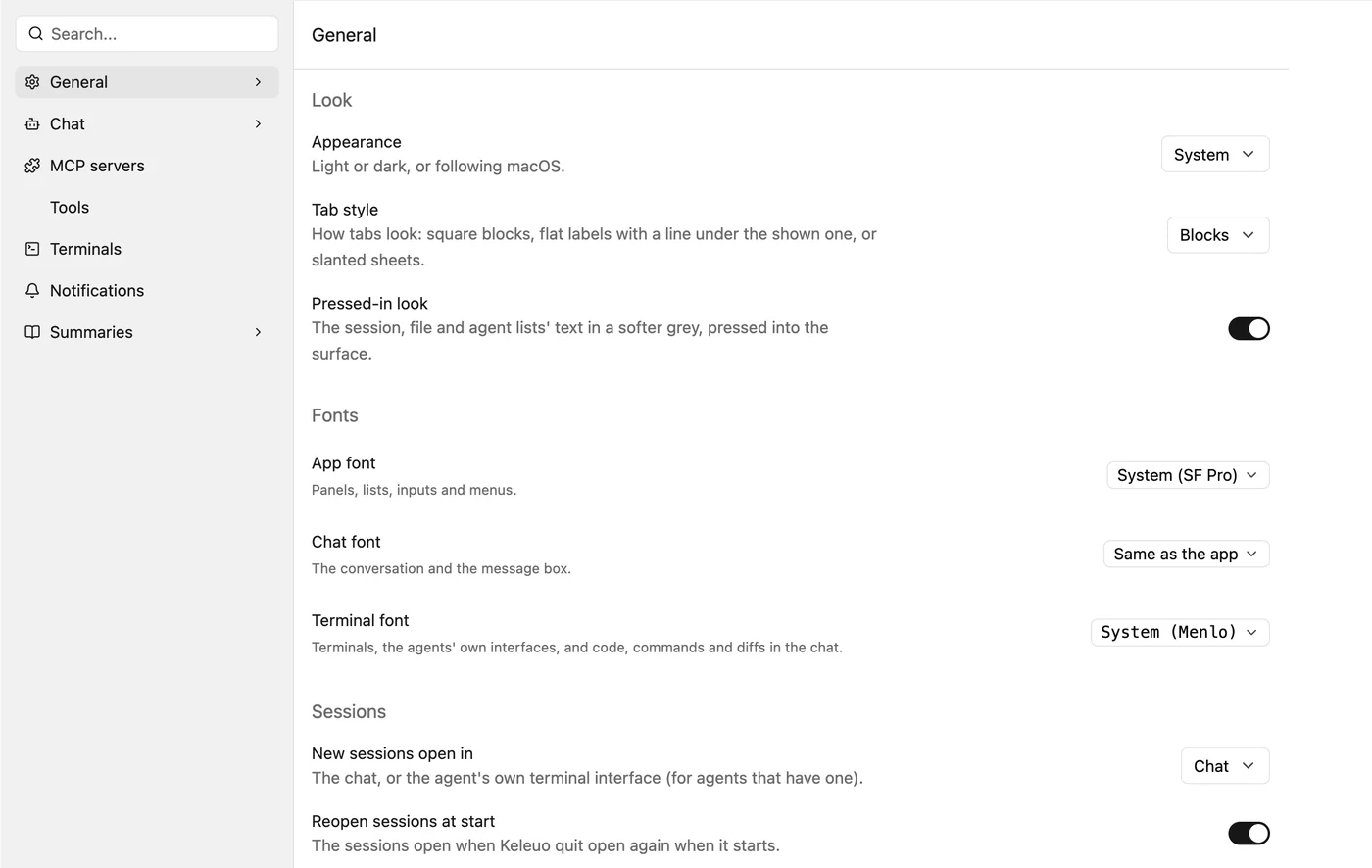
Settings is a page in the window, with a search box. Choose light or dark, a tab style, and any Google Font for the app, the chat and the terminals. MCP servers and your own command-line tools are set up once and every agent gets them. Terminals, notifications and turn summaries each have a page too.

Settings as a page in the window, open on General: Appearance, Tab style set to Modern and Pressed-in look under Look; App font, Chat font and Terminal font under Fonts; and Reopen sessions at start. The sidebar has a search box and the pages General, Chat, MCP servers, Tools, Terminals, Notifications, Summaries and Parent mode.

Where it stands

Early, and used every day.

Works today

  • Two AI coding agents, run as they ship
  • Images, sound, music and 3D models for games
  • Sessions as workspaces with live status
  • Projects, an inbox and task checklists
  • Permission prompts, question cards, diffs, subagents
  • A list of what each turn changed
  • Skills, file tree, editor, terminals
  • Continue, fork and worktree sessions
  • Sessions on another machine over SSH

Rough edges

  • Mac only to download; Windows runs but isn't released
  • The asset services need your own keys
  • Version 0.4, so expect changes

Next

  • More coding agents
  • A Windows release

Open source · Apache 2.0

Free, open source, and yours to change.

Wundur is written in Rust on gpui, the framework behind the Zed editor. There is no browser engine inside, so it opens quickly and stays small.

It started as one developer's own tool. If it helps you build what you're picturing, issues, ideas and pull requests are welcome.